
One Pickit account. A workspace for each business area.
Give country teams, divisions and business units their own workspace in Pickit. Each team can manage its libraries and assets, while account admins keep a view of the whole organization.
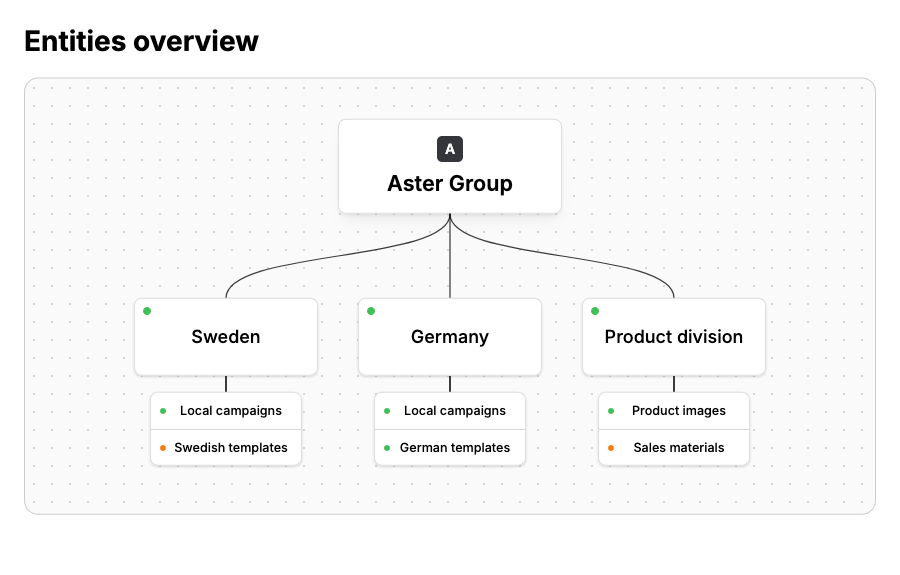
Give local teams a clear starting point.
The account has one shared homepage. People can switch between the Entities they have access to. You can set which Entity they start in based on their user, group or email domain. Opening an Entity takes them to the first library they can access.
 Aster Group

- Local campaigns
- Swedish templates
Give teams responsibility and keep a central view.
Choose who has access
Account admins decide who can access each workspace. Library permissions determine which content is available within it.
Assign local administrators
Delegate library and content administration to the people who know the material. Entity admins work within their assigned workspaces.
See how each Entity is used
Account admins can review publication and library access in the Entities overview, and see Insights for the whole account or an individual Entity.
Choose the setup that fits your organization.
Libraries
Organize content for an audience with its own browsing experience and access settings.
Explore libraries & smart foldersEntities
Give a country or business area its own workspace, libraries and administrators inside one Pickit account.
Pickit Family
Connect separate brand accounts under a parent account, with content and permissions managed per account.
Explore Pickit FamilyA few useful answers.
What do we need to use Entities?
You need a Pickit Enterprise account with Entities enabled. We can help you set up your first workspaces.
How do we start with an existing Pickit account?
Start with one country or business area. Agree on its audience and admins, then plan the libraries and any content moves with your Pickit team.
See how your organization could work in Pickit.
Bring your countries, business areas and current library setup. We’ll walk through an example with your team.