
Here are the main things to check:
1. Is the Brand Guide or Sub-guide published?
Make sure the Guide or Sub-guide containing the content has been published. When you have the guide open, go to Settings in the top right corner and toggle Publish brand guide / sub-guide on. 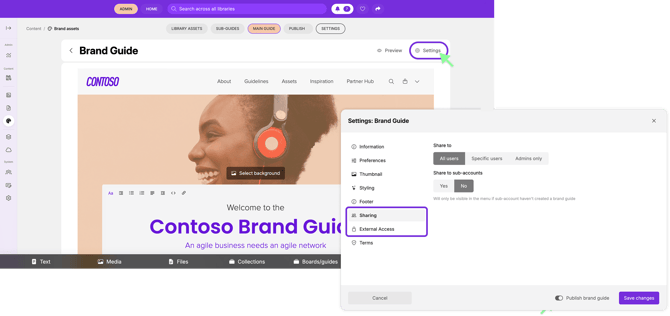
2. Is the Guide shared with all users?
Next, check the Sharing settings for the Guide.
If the content should be available to everyone in your Pickit account, make sure the Guide is shared with all users. When you have the guide open, go to Settings in the top right corner and check the settings under Sharing.
3. Should external users have access?
If someone outside your organization is trying to access the Guide, check whether it has also been shared with external users. When you have the guide open, go to Settings in the top right corner and check the settings under External access.
Sharing with your regular Pickit users doesn't automatically mean that external users have access.
4. Is the Entry Point published?
Check that the Entry Point leading to the content is also published.
Even if the content itself is ready, an unpublished Entry Point can prevent users from accessing it as expected.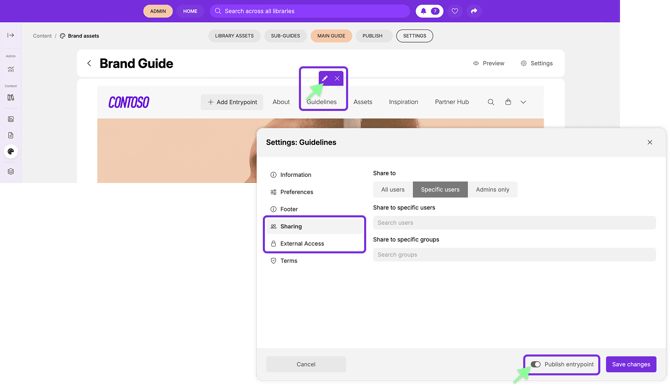
5. Does the specific section have the correct sharing settings?
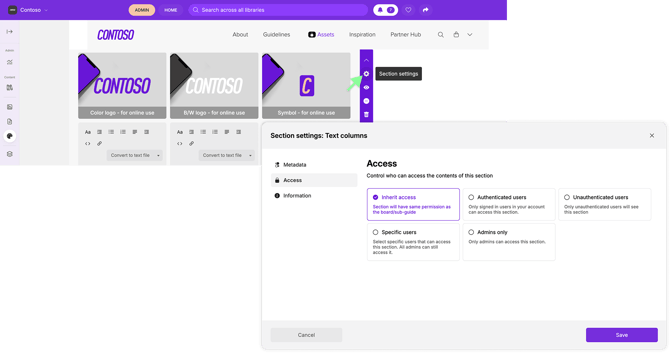
Finally, check the Sharing settings of the individual section the user is unable to see.
A section can have its own sharing settings, so make sure it is shared with the appropriate sharing setting.
Still can't see the content?
If you've checked that everything is published and the relevant sharing settings are correct, but users still can't see the content, contact us at support@pickit.com and we'll be happy to help investigate.