
Note: Only Admins and the account owner can remove users from Pickit.
Remove a user
- Sign in to Pickit on the web at https://app.pickit.com/.
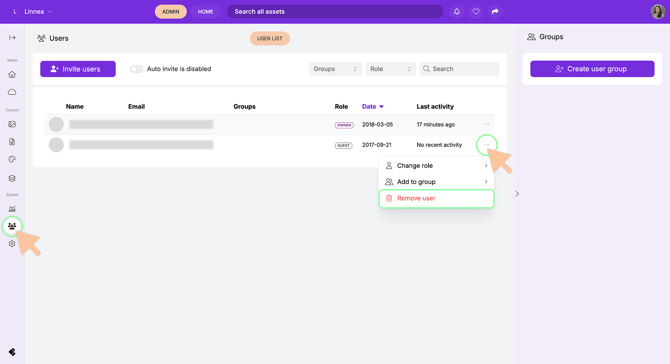
- Go to Admin Mode.
- Select Users from the left-hand navigation menu.
- Find the user you want to remove by browsing the list or using the search field.
- Click the three dots next to the user's name or email address.
- Select Remove User.
The user will immediately lose access to the Pickit account.
Note: If your organization uses Single Sign-On (SSO), users must still be removed manually from Pickit. Removing a user from your identity provider (such as Microsoft Entra ID or Okta) does not automatically remove them from your Pickit user list.